

The first hurdle every candidate faces is the resume. Most people start their job search by looking for tools to help them stand out, only to find that many of the most popular platforms are hiding behind a paywall. You spend an hour inputting your work history, tailoring your skills, and choosing the perfect layout, only to be asked for a credit card number at the final step. This leads many job seekers to a single, urgent question: how can I make a free resume without falling into these traps?
In this guide, we will explore the most effective, truly zero-cost ways to build a professional document. We will focus on transparent platforms and clever workarounds, ensuring you can focus your energy on the interview.
The hidden cost of free resume builders
It is a common scenario in the modern digital age. A website advertises itself as a free tool, but the definition of free is often stretched to its limit. Sometimes it means you can build it for free but cannot download it. Other times, you get a version with a massive watermark that makes you look unprofessional to recruiters. When you are between jobs, every dollar counts, and spending twenty or thirty dollars on a single document feels like a hurdle you should not have to clear.
The reality is that companies need to make money, but as a job seeker, you need a break. Understanding how can I make a free resume requires looking past the big advertisements and finding the tools that actually deliver on their promises. You need a document that is clean, professional, and compatible with the software that companies use to scan applications.
The best way to make a free resume online
If you are looking for a straightforward path that does not involve hidden fees or surprise subscriptions, the Career Reload free resume builder is the gold standard. Unlike many other platforms that trick users, this tool was designed with the job seeker’s budget in mind. It prioritizes utility and accessibility over monetization.
When using this builder, you are greeted with a clean interface that guides you through the process of adding your contact information, professional summary, work history, and education. The builder is specifically designed to handle the heavy lifting of formatting. You do not have to worry about margins, font consistency, or alignment because the software handles it automatically.

Key features of the Career Reload builder include:
- Instant PDF, Word .doc, and TXT exports that do not require a sign-up or premium account.
- Clean, ATS layout that satisfies the aesthetic preferences of human recruiters.
- A user-friendly interface that works well for those who are not tech-savvy.
- AI to help you write your summary and work experience bullet points.
- No intrusive watermarks that distract from your qualifications.
Because the output is a clean PDF, you can be sure that your formatting will remain intact regardless of what device the hiring manager uses to view it. This is the most direct answer to the question of how can I make a free resume while maintaining a high level of professionalism.
When it comes to privacy, everything is done in the browser; if you exit the page without finishing your resume, it’s gone. Nothing will be stored. If you use the AI assist button to write your summary or work experience, the data filled in those fields will be sent to OpenAI, but it will be anonymous since it doesn’t include your name or contact info.
How to use free resume templates for maximum control
While automated builders are excellent for speed, some candidates prefer to have total control over every comma and bullet point. This is where the free resume templates come into play. Using a template is often the preferred method for individuals who want to keep a master copy of their resume on their own hard drive or cloud storage. And people who worry about their privacy.
These templates are professionally designed and categorized into different file formats and styles, such as modern, creative, and professional. The greatest advantage here is compatibility. These templates are typically available for Microsoft Word, Google Docs or Apple Pages. This means you can download a high-end design for free and then use software you already know to customize it.


If you are wondering how can I make a free resume using these templates, the process is simple:
- Browse the library of free resume templates and select a design that matches your industry. A law firm might require a more traditional look, while a marketing agency might appreciate something more modern.
- Download the file to your computer.
- Open the file in your preferred word processor.
- Replace the placeholder text with your own information.
- Save the file as a PDF before sending it to employers.
The MyPerfectResume free way: How to navigate the paywall
MyPerfectResume is one of the most famous tools in the industry. It is known for its excellent pre-written phrases and expert suggestions that help users describe their work history more effectively. Even they often advertise being free, most users find that after building their resume, they are asked to pay for a subscription to download the file. If you are determined to use their content suggestions without the cost, there is a workaround.
The free way to use this platform involves using their “engine” for its intellectual value rather than its export features. When you build a document on their site, you have access to thousands of bullet points tailored to specific job titles. If you are struggling with writer’s block, this is incredibly helpful.
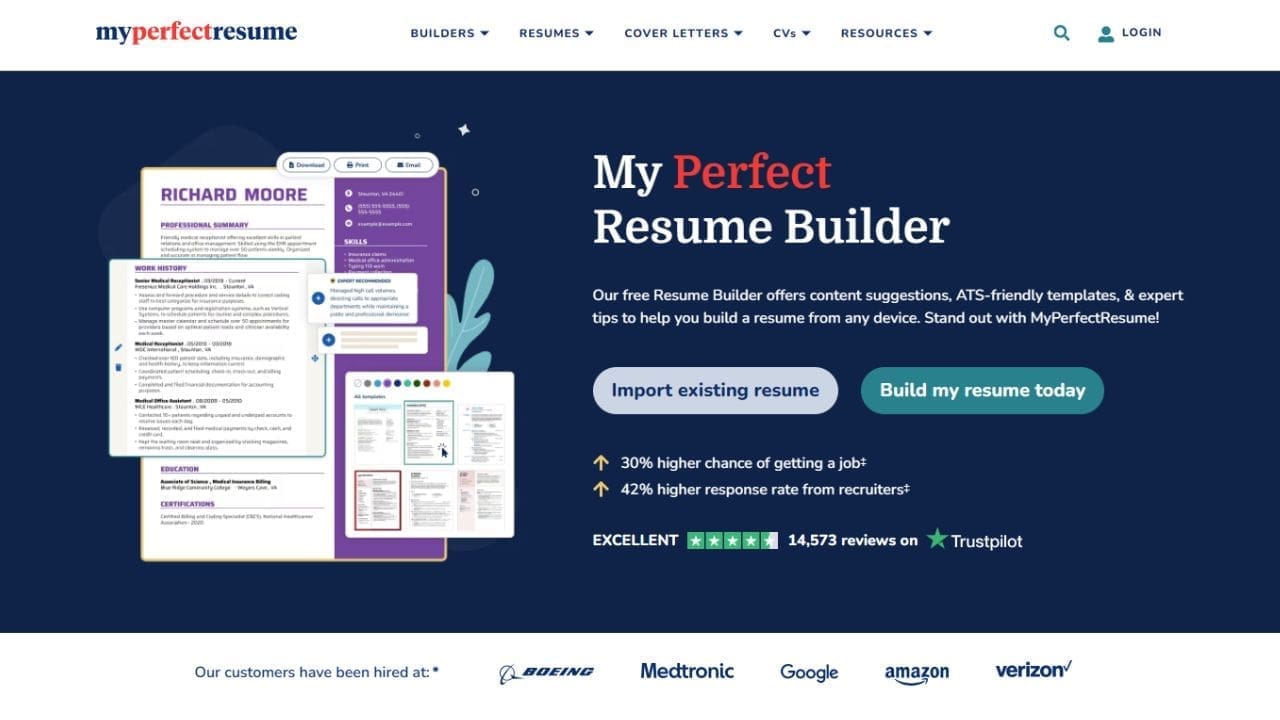
To use this method effectively:
- Go through the building process on the site to see their suggestions for your specific role.
- Instead of clicking the download button at the end, keep the window open.
- Open a blank Google Doc or a Career Reload template in another window.
- Manually copy and paste the text you have generated into your free document.
- Use the “text file” or “print to PDF” preview options if available to view your text, then copy it.
This allows you to benefit from their high-quality writing prompts while still adhering to your goal of not spending money. It takes a little more manual effort, but it is a valid strategy when you are asking how can I make a free resume but want the benefit of expert phrasing. If that sounds like too much trouble, you should signup for their trial that is only $2.95 for the first 14 days.
Other zero-cost alternatives you already own
In the search for specialized tools, many people forget about the powerful software they already have access to. If you have a Gmail account or a computer with basic software, you have everything you need.
Google Docs is a hidden gem for job seekers. Within the Google Docs dashboard, there is a template gallery that includes several resume options. These are inherently free and very easy to share with others for feedback. They are also designed to be simple, which is actually a benefit because simple resumes are often the most successful when passing through automated screening systems.
Read how to create a resume in Google Docs.
Microsoft Word also offers a massive library of templates. When you open Word and click on “New,” you can search for resumes in the search bar. These range from very basic to highly stylized. The benefit of Word is that it remains the industry standard for document and resume creation, ensuring that your file will be readable by almost any employer.
Read how to create a resume in Microsoft Word.
Canva is another popular option for those in creative fields. If you are a graphic designer or a social media manager, a Canva resume can show off your visual skills. However, be cautious with this approach. Very complex designs with multiple columns and graphics can sometimes be difficult for ATS to read. If you use Canva, try to keep the layout logical and the text clear.
Pro tips to ensure your free resume actually gets you the interview
Creating the document is only half the battle. To truly answer the question of how can I make a free resume that works, you must focus on the content. A free resume that is poorly written is just as ineffective as an expensive one.
First, focus on keyword optimization. Look at the job description for the position you want. Identify the specific skills and software they mention. If the job description asks for “project management” and “team leadership,” make sure those exact phrases appear in your text. This ensures that when an employer searches their database, your name comes up.
Second, use strong action verbs. Instead of saying you were “responsible for” a task, say you “spearheaded,” “transformed,” or “executed” it. This makes you sound like a proactive contributor rather than a passive employee.
Finally, use free proofreading tools. Grammarly has a free version that can catch typos and grammatical errors that your eyes might miss after staring at the screen for hours. A single typo can be enough for a recruiter to move on to the next candidate, so this step is vital.
Frequently asked questions about free resumes
Many job seekers have specific concerns when they ask how can I make a free resume. Here are some of the most common questions addressed:
How can I make a free resume that is compatible with ATS software?
The best way to ensure compatibility is to use a clean, single-column layout. Avoid putting important information in headers, footers, or images. Stick to standard fonts. Career Reload templates are specifically built to meet these standards.
Are free resume builders safe to use?
Most reputable sites like those mentioned here are safe. However, always be cautious about sites that ask for highly sensitive information like your social security number or bank details. A legitimate resume builder only needs your resume data: contact information, work history, education and skills.
Can I download my resume as a PDF for free on Career Reload?
Yes, the primary advantage of the Career Reload builder is the ability to export your finished document as a PDF without having to pay a fee or sign up for a monthly subscription.
Is there a website that offers free resume builders with step-by-step guidance?
Yes, Career Reload provides a structured environment that guides you through the entire document creation process. This platform ensures you do not miss critical sections such as your professional summary, work history, or technical skills. By following the tool tips and logical flow of the builder, you can produce a high-quality document without needing a background in design or human resources.
How do I make a resume without paying for software?
You can create a standout document by utilizing resources that are already available to you or by visiting dedicated free platforms.
You have several reliable options:
- Use the Career Reload resume builder to create and export a PDF directly from your browser.
- Download Career Reload free resume templates and edit them using Google Docs, which is a zero-cost cloud cloud-based word processor.
- Utilize the built-in templates in Microsoft Word Online if you have a free Microsoft account.
Your career should not have a cover charge
When you sit down and ask yourself how can I make a free resume, remember that you have options. You can use a dedicated builder for speed, a template for control, or even a workaround on premium sites to get the best of both worlds. The most important thing is that your resume accurately reflects your skills and your potential.
Do not let a paywall stand between you and your next career move. Use the resources available to you, proofread carefully, and start applying with confidence. Your next employer is looking for your skills, not the brand of the software you used to list them.

Alex is a career expert who specializes in resume writing and job search strategies. He focuses on sharing real-world tips that make work and job search feel more manageable.
Others also read
How to Write a Summary of Qualifications for a Resume (With Examples)
How To Write a Resume For a High School Student’s First Job (Examples & Template)
How to Write a Functional Resume for a Career Change (Examples + Templates)
How Can I Make a Free Resume?
350+ Resume Action Verbs for 2026
How to Write a Professional Resume Summary (With Examples)
14 Things to Remove From Your Resume 2026
Teacher Assistant Resume Example That Work
You Might Also Like These Free Templates
Resume Template in Word Document
Google Docs Resume Format – Debbie
Free Template for Resume
Free Resume Form Template
2 Column ATS Resume Template
ATS Friendly Resume Format for Word – Lindsay
Cover Letter Template with Monogram
Professional Cover Letter Template
Free Modern Resume Template for Word
Free Job Application Tracker for Excel
Free Resume Template Download for Word – Farrah
Free ATS-Friendly Resume Template – Emily