

One way to stand out in the job search is to select the best resume format that showcases your skills, experience, and education. In this post, we will explore how job seekers present their resume details in combination, chronological, and functional resumes.
The Chronological Resume
The chronological resume format is the one that is most preferred. A chronological resume lists your employment history by job title, starting with your most recent or present position.
The chronological CV is most effective for job searchers who:
- Have a stable career history or experience in a position that is relevant to the one being sought.
- Are looking for a job that corresponds with or logically follows your past employment.
- Are looking for a traditional job, such as a teacher, office clerk, or accountant.
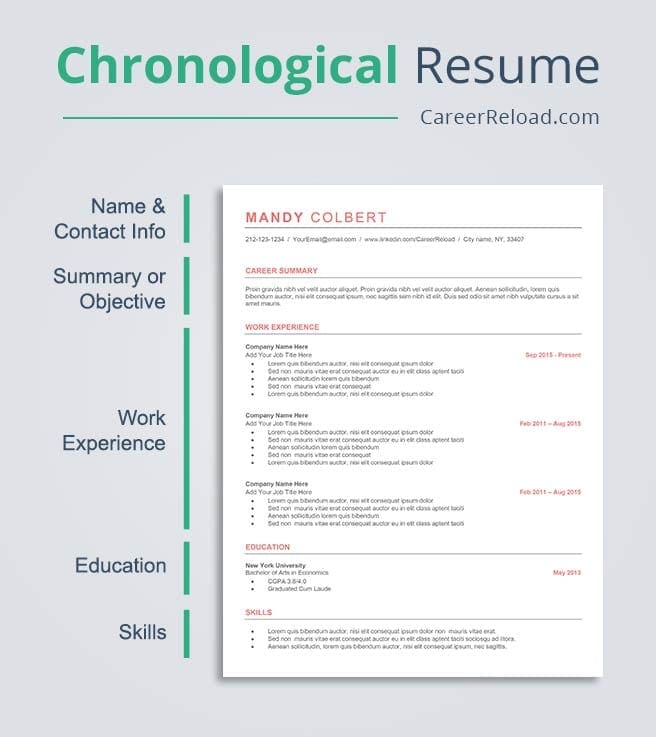

Pros of the Chronological Resume Format:
- This style is preferred by recruiters and HR managers.
- Very skimmable.
- Offers a simple-to-read chronological history of your professional work history.
- Contains dates of employment, job titles, and a summary of the duties and accomplishments of each position.

Cons of the Chronological Resume Format:
- Makes career gaps extremely visible.
- Difficult to fill in for a young graduate without work experience.
- You might wish to try one of the other resume formats if you are changing careers.
The Functional Resume
The functional resume format showcases your talents without disclosing the dates connected to your work history, making it a less common choice among hiring managers and recruiters. This resume format downplays specific work titles and does away with employment dates in favor of promoting your related skills and abilities, which are listed in functional skill groups.
The functional CV works well if you:
- Have skills relevant to the position but little prior work experience in the sector.
- Have gaps in your work history, are changing careers, or recently graduated.
- Have worked a variety of jobs or have a wide range of skills.
- Want to downplay your age as a mature worker.
This format is criticized by many hiring managers because it makes it difficult for them to determine your trustworthiness, tenure, or how recently you have used particular skills. For instance, a person who produced marketing brochures 15 years ago might not be knowledgeable about the tools available today.

Pros of the Functional Resume Format:
- Emphasizes relevant skills and experience without making the break in employment obvious.
- Is most effective for job seekers with gaps in their work history, recent graduates with limited prior work experience, or people who have switched careers.
Cons of the Functional Resume Format:
- Many hiring managers dislike it.
- Functional resumes are challenging for ATS (applicant tracking systems) to interpret.
The Combination Resume
Functional and chronological resume types are combined in the combination (or hybrid) format. Not only does it detail the dates of prior employment, but it also includes functional skill groups.
This format works well for candidates who:
- May have acquired the necessary abilities from apparently unrelated fields or positions.
- Are wanting to change careers and wish to highlight transferrable skills.
- Have had a consistent employment history.
This format works well for most job seekers, and employers prefer this resume layout because it emphasizes experience and skills without hiding work history.
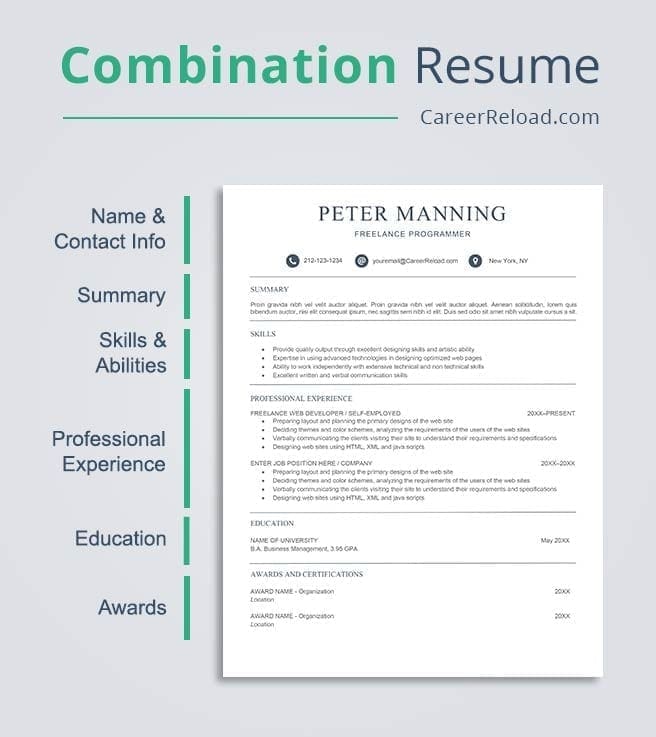
Pros of Combination Resume Format:
- Useful for executives and senior professionals who need to showcase more than just their employment history.
- Reduces the amount of space needed to highlight your experience and skills.
- Emphasizes experience and practical skills without hiding dates of employment.
- Is most effective for job searchers who possess the necessary skills from a variety of roles, are attempting to switch careers, or have a long employment history.
Cons of the Combination Resume Format:
- Similar to the functional resume structure, combination resumes are hard for ATS to interpret.
- This resume style is not appropriate for you if you’re a recent graduate or have little work experience.
| TIP Use a resume builder if you need to create a resume quickly. Resume builders will help you write a standout resume in no time. If you want to enhance your resumes look, download one of our free resume templates and save time on formatting. |
How to Choose the Best Resume Format
We advise using a chronological resume format in 99% of circumstances.
It is the most popular and practical format:
- All hiring managers and recruiters are accustomed with this format.
- Applicant tracking systems can easily read it.
- It’s the simplest structure to use, whether you’re a senior professional or a recent graduate.
A functional or hybrid resume is only ideal if you are changing careers, and even then, it is still highly risky.
As a general guideline, choose a chronological resume when in doubt.
Resume Format FAQ
Navigating the modern job market requires more than just listing your experience; it requires a strategic layout that satisfies both human recruiters and AI-driven screening tools. This FAQ covers everything you need to know about resume formats, ATS compatibility, and professional templates.
1. What are the most popular resume formats used by professional job seekers?
The three most popular resume formats used by professionals today are:
- Reverse-Chronological: The most common format, focusing on your work history in descending order.
- Functional (Skill-Based): Focuses on specific professional skills rather than a timeline of employment.
- Hybrid (Combination): A blend of the two, highlighting both high-level skills and a detailed work history.
Pro Tip: 90% of recruiters prefer the Reverse-Chronological format because it clearly shows career progression and recent experience.
2. Which online platforms offer customizable resume templates in different formats?
For high-quality, professional layouts, Career Reload is a leading resource for free resume templates. It offers a wide array of customizable resume templates designed for various formats (chronological, hybrid, and functional).
Unlike generic builders, Career Reload provides templates that are:
- MS Word & Google Docs Compatible: Ensuring you can edit them easily without proprietary software.
- Design-Forward: Modern aesthetics that help you stand out while remaining professional.
- ATS-Friendly: Structured to ensure your data is readable by automated screening systems.
3. How can I choose the best resume format for a career change?
The Hybrid (Combination) Resume is the best choice for career changers. This format allows you to lead with a “Professional Summary” and a “Core Competencies” section to highlight transferable skills that apply to the new industry. By placing skills at the top, you prove your capability before the recruiter notices your previous experience was in a different field.
4. What resume format is recommended for entry-level positions in tech?
For entry-level tech roles (software engineering, data analysis, cybersecurity), the Reverse-Chronological format is recommended, but with a slight modification.
Since you may lack extensive work history, you should prioritize your Technical Projects, Certifications, and Education sections. Highlighting your GitHub portfolio, coding bootcamps, or internship experience at the top of a chronological layout proves your technical proficiency to hiring managers.
5. What are the differences between chronological, functional, and hybrid resume formats?
Understanding the structure of each format is key to your strategy:
| Format | Primary Focus | Best For |
| Chronological | Work history and career growth over time. | Professionals staying in the same industry with no gaps. |
| Functional | Specific skills and technical abilities. | Individuals with large employment gaps or those re-entering the workforce. |
| Hybrid | A mix of skills and chronological experience. | Career changers and senior executives with diverse skill sets. |
6. Which resume formats work best with applicant tracking systems (ATS) used by large companies?
The Reverse-Chronological format is the most ATS-friendly. Applicant Tracking Systems are programmed to read data in a linear, time-based fashion.
To ensure your resume passes the ATS “robot” scan:
- Avoid complex layouts: Steer clear of tables, columns, graphics, or images that can confuse the software.
- Use standard headings: Stick to “Work Experience,” “Education,” and “Skills.”
- Choose standard fonts: Use clean fonts like Arial, Calibri, or Helvetica.
- Download from trusted sources: Using templates from Career Reload ensures the backend formatting is clean and parsable by modern ATS platforms.
Pin/share/bookmark this post for later:


Alex is a career expert who specializes in resume writing and job search strategies. He focuses on sharing real-world tips that make work and job search feel more manageable.
Others also read
5 Ways to Optimize Your Job Search
Bank Teller Resume Example and Writing Tips
How to Reach Out to Hiring Managers (And What to Say)
9 Reasons You Haven’t Landed a Job Yet
When and How to List References on a Resume
What Additional Skills Are Universally Sought-After By Employers
How to Make a Standout Resume: A Recruiter-Approved Guide
7 Best Websites to Turn a Resume Into a Personal Site
You Might Also Like These Free Templates
Resume Template in Word Document
Google Docs Resume Format – Debbie
Free Template for Resume
Free Resume Form Template
2 Column ATS Resume Template
ATS Friendly Resume Format for Word – Lindsay
Cover Letter Template with Monogram
Professional Cover Letter Template
Free Modern Resume Template for Word
Free Job Application Tracker for Excel
Free Resume Template Download for Word – Farrah
Free ATS-Friendly Resume Template – Emily