

Every January, our team reviews the resume templates in our library and picks the ones that outperformed everything else the previous year. This page is the 2026 shortlist. It reflects which layouts recruiters respond to, which ones pass Applicant Tracking Systems on the top hiring platforms, and which ones our readers download most often.
If you would rather browse the full library, visit our free resume templates page. Otherwise, keep reading. What follows are the picks we recommend first for 2026, grouped by the software you plan to edit them in.
How we selected these templates:
- ATS parsing accuracy across major hiring platforms
- Recruiter feedback on layout, hierarchy, and readability
- Download volume across more than 613,000 users
- Design quality and how quickly each one can be edited
Most of these picks come with a matching cover letter so your application looks consistent from start to finish.
If you are looking for resume examples by industry, visit our resume examples page. For further resume writing help, read our ultimate resume writing guide.
Share your favorites on social media!
Free AI Resume Builder
Try our free AI resume builder, and create an optimized ATS resume in no time. Creating a resume has never been this easy!
Our Top Microsoft Word Picks for 2026
Microsoft Word remains the gold standard for corporate applications. These Word resume templates use standard formatting to ensure your data is parsed correctly by modern hiring software.
The Universal “Any Job” Template (Denice)

Versatility is the core of this design. Built to be a “chameleon” in the job market, this template uses a flexible structure that works equally well for entry-level applicants and seasoned professionals. It focuses on a high-impact summary and a clean skills grid, allowing you to quickly pivot your resume for different industries without having to redesign the layout.
- Format: .docx (Microsoft Word)
- Best for: Generalists, applying for large corporations using ATS
- Download: Resume for Any Job
The Standard Word Document Format (Richard)

This template is a “plug-and-play” document that strips away unnecessary design elements to focus purely on content. It is built using standard Microsoft Word styles, ensuring that you can edit the style and color scheme with one click.
- Format: .docx (Microsoft Word)
- Best for: Applicants who want a classic, no-nonsense layout.
- Download: Resume in Word Document
The “Microsoft Professional” Layout (Ryan)
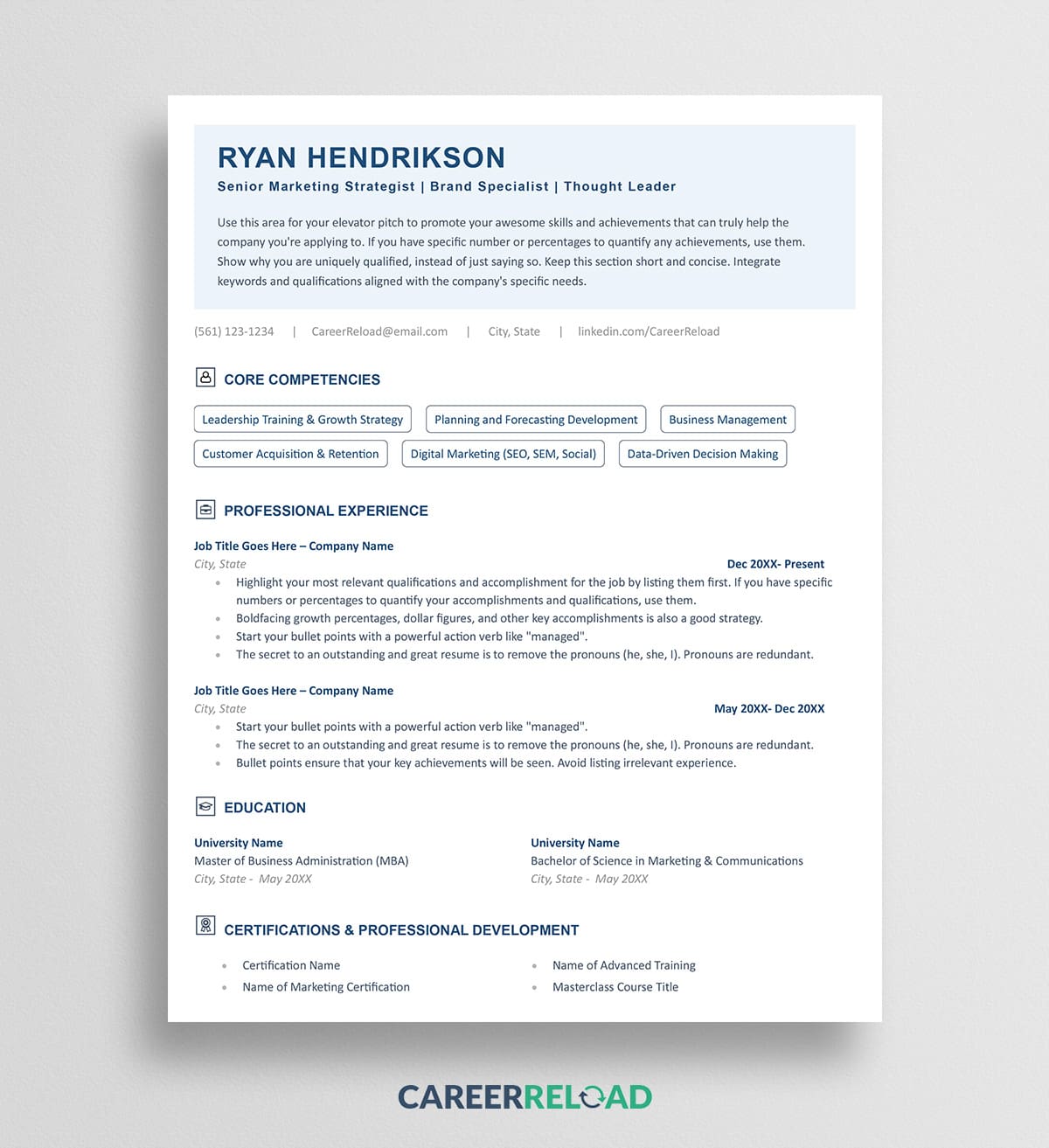
This template offers a high-tier corporate aesthetic, featuring a sophisticated header and optimized line spacing for better readability. It is designed to look like a premium executive document, helping you stand out in competitive corporate environments. The structure is highly organized, making it easy for recruiters to scan your career progression and key milestones in seconds.
- Format: .docx (Microsoft Word)
- Best for: Management-level professionals, finance experts, and those applying for established corporate roles.
- Download: Microsoft Resume
The Modern Professional Format (Alex)

This layout is designed for professionals who need to showcase deep qualifications without the clutter. It features a sleek design that prioritizes readability while maintaining a polished appearance. With dedicated zones for your professional summary, work history, and skills, it’s built to grab attention within the first six seconds.
- Format: .docx (Microsoft Word)
- Best for: Corporate, Management, and Administrative roles.
- Download: Modern Professional Format
Clean Word Resume Layout (Carla)

This template strikes a perfect balance between approachability and professionalism. The layout uses white space effectively to ensure recruiters don’t feel overwhelmed by text. It includes specific sections for expertise, technical skills, and certifications, making it ideal for specialized roles.
- Format: .docx (Microsoft Word)
- Best for: Technical specialists and mid-level professionals.
- Download: Clean Word Layout
Modern Resume with Photo (Megan)

In industries or regions where a professional headshot is standard, this template provides a clean, integrated space for a photo. It maintains a sophisticated layout that frames your contact details and skills alongside your professional image without sacrificing space for your work history.
- Format: .docx (Microsoft Word)
- Best for: Real estate, acting, and international applications.
- Download: Resume with Photo
2-Column ATS-Optimized Template (Kevin)

One of our most popular designs, this 2-column layout allows you to present a high volume of information on a single page. Unlike complex designs, this template is structured to be 100% ATS-friendly, ensuring your “Skills” and “Projects” are parsed correctly.
- Format: .docx (Microsoft Word)
- Best for: Tech and candidates with a diverse set of projects and certifications.
- Download: 2-Column ATS Template
Updated “Modern CV” Template (Jennifer)

This is our flagship template for 2026. It features an updated header design and a expanded space for “Technical Skills” directly following the summary. If your experience exceeds one page, this template is designed to flow seamlessly onto a second page while maintaining visual consistency.
- Format: .docx (Microsoft Word)
- Best for: Senior roles and long-tenure careers.
- Download: Modern CV Template
The Standard ATS-Friendly Layout (Lindsay)

When in doubt, go with the “Safe” option. This template is designed specifically for high-volume applications at medium to large companies. It uses standard headings and a linear structure that modern recruitment software prefers, significantly reducing the risk of parsing errors.
- Format: .docx (Microsoft Word)
- Best for: Large-scale corporate applications.
- Download: Standard ATS Friendly Layout
ATS-Friendly Template (Emily)

In 2026, large and mid-sized companies rely almost exclusively on automated screening. The “Emily” template is engineered specifically for these systems, using a high-readability linear structure that ensures your data is parsed with 100% accuracy. It’s the essential “safe” choice for any high-volume application portal.
- Format: .docx (Microsoft Word)
- Best for: Applicants at large corporations using ATS
- Download: ATS-Friendly Resume Template
Professional Resume (Julie)

This layout is a masterclass in information density. It is designed to help you present a significant amount of data. You can list your skills or awards or change the headline to something else, such as publications, and list them there. This template is particularly effective if you need to direct recruiters to an online portfolio or GitHub repository.
- Format: .docx (Microsoft Word)
- Best for: Mid-to-senior level professionals.
- Download: Professional Resume
Modern Photo Resume (Farrah)
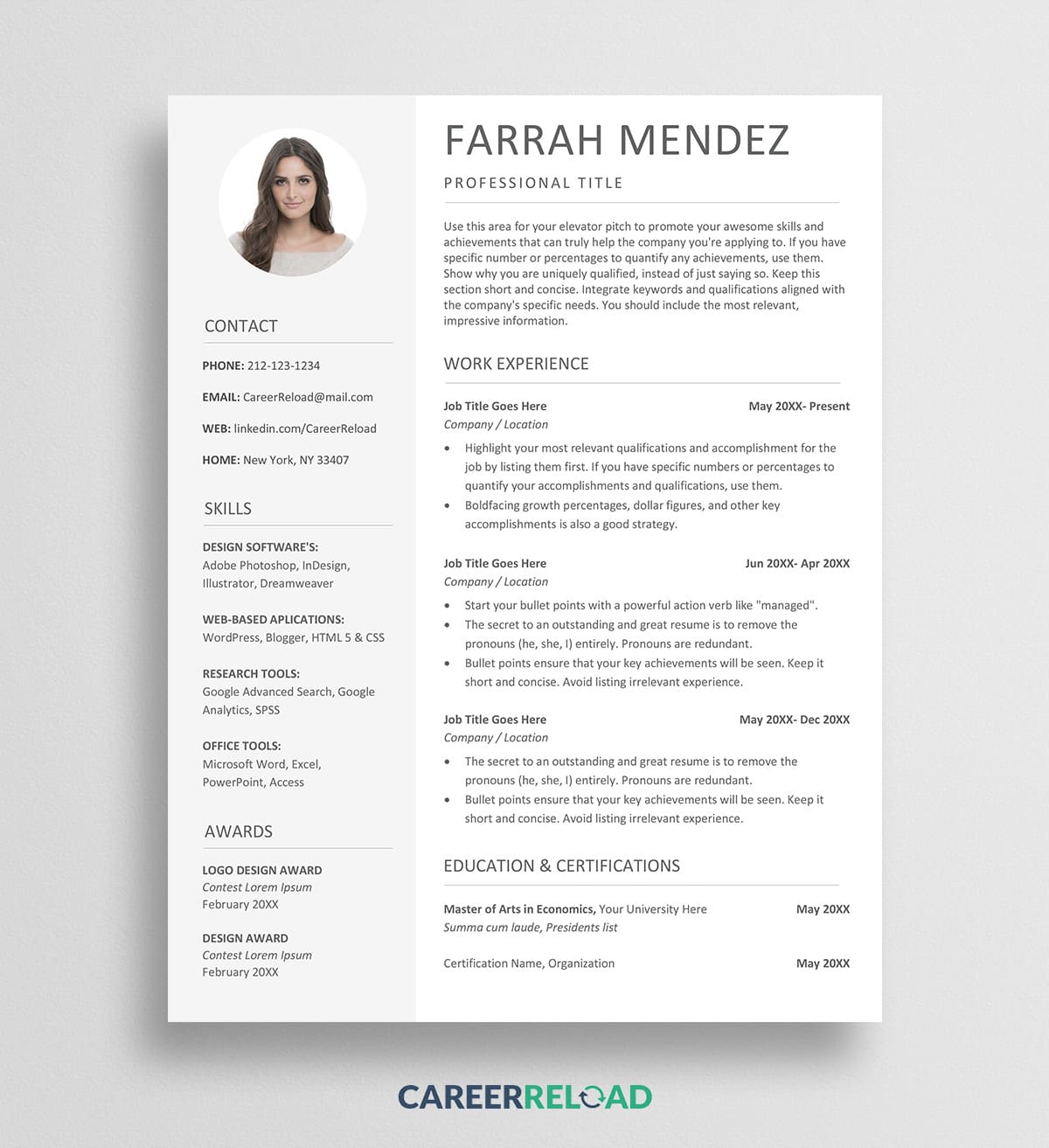
Consistently our most popular photo-based design, the “Farrah” offers a modern, balanced aesthetic. It features a modular sidebar that houses your photo and contact details. If your specific role doesn’t require a headshot, the design is flexible enough to allow you to remove the photo and move your skills content up for a clean look.
- Format: .docx (Microsoft Word)
- Best for: Customer-facing roles, real estate, hospitality, and international job markets where a headshot is expected.
- Download: Resume With Photo
Our Top Google Docs Picks for 2026
Google Docs is the preferred choice for those who want to edit in a browser and have their resume accessible on any device. These Google Docs resume templates are fully compatible with Google’s online suite.
Modern Google Docs CV (Elroy)

A clean, browser-ready template that can be exported as a professional PDF in seconds. This layout is designed for the modern job market, focusing on a strong summary and a clear, chronological work history.
- Format: Google Docs (Edit Online)
- Best for: Tech startups, remote work applications, and modern corporate roles.
- Download: Modern Google Docs CV
Google Docs Layout with Photo (Paige)

A minimalist approach to the photo-resume. The header keeps your contact info and headshot organized, leaving the main body of the page open for your professional achievements. If you decide you don’t need a photo, it can be removed with one click.
- Format: Google Docs (Edit Online)
- Best for: Creative professionals, real estate agents, and industries requiring personal branding.
- Download: Google Docs Photo Resume
Compact 2-Column Docs Template (Melvin)

Perfect for those who want to list their projects. This template organizes your projects, education, and professional development into a compact, easy-to-read 1-page resume.
- Format: Google Docs (Edit Online)
- Best for: Tech, project managers and freelancers.
- Download: Compact 2-Column Docs Template
Simple Google Docs Resume (Will)

This template is for the minimalist who wants to pass the “bot test” every time. It uses classic typography and a standard reverse-chronological layout that is both timeless and highly functional for 2026 hiring standards.
- Format: Google Docs (Edit Online)
- Best for: Academic, government, legal, and traditional corporate sector applications.
- Download: Simple Google Docs Template
Traditional Google Docs Resume (Mindy)

This is the “gold standard” for compatibility. It uses a classic, single-column flow designed specifically to be parsed flawlessly by any Applicant Tracking System (ATS). While the structure is traditional, the 2026 update features refined typography and optimized spacing to ensure it looks modern and professional to human eyes once it reaches a recruiter’s desk.
- Format: Google Docs (Edit Online)
- Best for: Government positions, legal roles, and high-volume corporate applications.
- Download: Traditional Google Docs Template
Modern Google Docs Resume Template (Lisa)

This layout offers a fresh approach to the standard resume by using subtle design elements to guide the reader’s eye. It allows you to present your most vital information immediately. It’s a clean, efficient design that works perfectly for the digital-first job market.
- Format: Google Docs (Edit Online)
- Best for: Professionals in tech, marketing, and SaaS.
- Download: Modern Google Docs Resume Template
Our Top Apple Pages Picks for 2026
For Mac and iCloud users, these Apple Pages resume templates offer high-end typography and clean design elements that reflect the modern Apple aesthetic.
Modern Mac Pages Template (Penelope)

A template that relies on bold headers and clean lines. This layout is perfect for handing over at an interview or a job fair, as the printed version looks exceptionally crisp and professional.
- Format: .pages (Apple Pages / iCloud)
- Best for: Designers and creative-adjacent professionals.
- Download: Minimalist Mac Pages Template
Apple Pages Resume Template (Joyce)

This template provides extra room for bullet points. If you have a long work history with multiple significant achievements under each role, this layout gives you the vertical space you need without looking cluttered.
- Format: .pages (Apple Pages / iCloud)
- Best for: Senior-level candidates, long-tenured professionals.
- Download: Apple Pages Resume Template
Professional Mac Resume with Left Sidebar (Nancy)

By placing your education and core competencies in a left-hand sidebar, this template allows the recruiter’s eye to focus immediately on your most recent work experience, the most important part of any 2026 resume.
- Format: .pages (Apple Pages / iCloud)
- Best for: Candidates who want to emphasize core competencies alongside work history.
- Download: Professional Mac Pages Resume
Modern Resume with Right Sidebar (Deborah)

This elegant Apple Pages template utilizes a right-hand sidebar to house “supplementary” information like your education, skills, and contact details. By shifting these to the side, you leave the main body of the page open for an uninterrupted, chronological work history, a layout that recruiters find exceptionally easy to scan quickly.
- Format: .pages (Apple Pages / iCloud)
- Best for: Candidates with a long career history who need to maximize the “prime real estate”..
- Download: Free Resume Template for Pages
Minimalist Mac Pages Photo Resume (Ada)
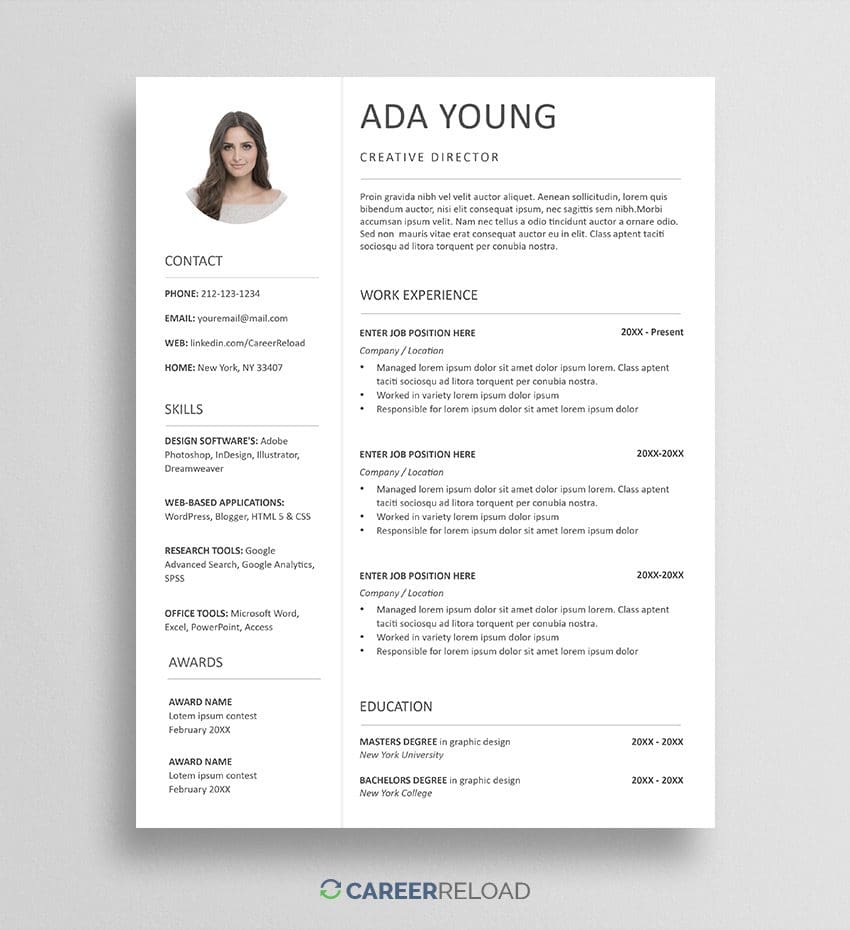
A high-contrast, minimalist design for users who need a professional headshot integrated into their CV. This template leverages the native design power of Apple Pages to create a crisp, high-resolution document that looks beautiful both on screen and in print. The surrounding layout is kept intentionally airy to ensure your experience remains the focal point.
- Format: .pages (Apple Pages / iCloud)
- Best for: Public-facing roles, freelancers, and creative professionals in markets where a professional photo is a standard requirement.
- Download: Pages Photo Resume Template
Frequently Asked Questions (FAQ)
What is the most effective resume format for 2026?
The Hybrid (or Combination) format is the most effective for the current job market. It combines the best of the “Functional” and “Chronological” styles, starting with a punchy skills summary to catch a recruiter’s eye, followed by a detailed, reverse-chronological work history to prove your experience.
Do recruiters prefer Word or PDF files in 2026?
While most modern ATS can read both, PDF is generally preferred for direct email or human review because it preserves your formatting perfectly across all devices. However, if an application portal specifically asks for a .docx file, use a Word document to ensure the software parses your data correctly.
Should I still use a resume template?
Yes. Using a template ensures your resume is organized and follows the visual hierarchy that recruiters expect. In 2026, recruiters often spend less than 10 seconds on the first pass; a well-structured template ensures they see your most important qualifications immediately.
What is the best resume font?
Clean, sans-serif fonts are the standard for 2026. Fonts like Inter, Lato, Roboto, or Helvetica are highly readable on screens and maintain a modern, professional look. Avoid outdated fonts like Times New Roman unless you are applying for very traditional legal or academic roles.
Does ATS read PDF?
Yes, most modern Applicant Tracking Systems (ATS) used can read PDF files without issue. However, this only applies to text-based PDFs. If you save your resume as an image-based PDF (or a scan), the ATS will see a blank page. To ensure compatibility, always export your resume directly from Word, Google Docs, or Pages as a PDF. If you are applying to a company with older legacy software, a .docx file is still the safest “fail-proof” option for parsing accuracy.
Where to get resume templates with built-in cover letter designs?
Career Reload provides a wide selection of resume templates that come with matching cover letter designs. Consistency is key to a professional application; using a matching set ensures your personal branding, including fonts, margins, and header styles, remains uniform across your entire application package. Simply look for the “Matching Cover Letter” link on our download pages to get a cohesive design for both your resume and your letter.

Alex is a career expert who specializes in resume writing and job search strategies. He focuses on sharing real-world tips that make work and job search feel more manageable.
Others also read
How to Use the STAR Method to Ace Your Job Interview
How to Attract Employers With a Professional LinkedIn Profile
Entry-Level Data Analyst Resume Example and Template
Effective Project Manager Resume Examples & Template
College Resume Example That Helps You Standout
How to Become a Professional Santa
How to Succeed in a Law Firm Job Interview
How to Pass a Pre-Employment Personality Test
You Might Also Like These Free Templates
Resume Template in Word Document
Google Docs Resume Format – Debbie
Free Template for Resume
Free Resume Form Template
2 Column ATS Resume Template
ATS Friendly Resume Format for Word – Lindsay
Cover Letter Template with Monogram
Professional Cover Letter Template
Free Modern Resume Template for Word
Free Job Application Tracker for Excel
Free Resume Template Download for Word – Farrah
Free ATS-Friendly Resume Template – Emily