

Looking for a resume template that passes applicant tracking systems and looks professional? Finding the right format can make the difference between landing an interview and getting filtered out before a human ever sees your application.
Google Docs offers a practical solution for job seekers who need accessible, editable resume templates that work with ATS software. These free tools let you create a polished resume without expensive design software or complicated formatting tricks.
In this post, you’ll explore free templates designed to pass screening software while still catching a recruiter’s eye.
Why ATS-Friendly Formatting Matters
Applicant tracking systems scan and parse resume content before human recruiters review applications. These systems look for specific information in predictable places using standard formatting. When your resume uses complex layouts, graphics, or unusual fonts, the software struggles to read your qualifications correctly.
An ATS-friendly Google Docs resume template solves this problem by using simple, clean formatting that both software and people can read easily. The right template helps you present your experience clearly without sacrificing visual appeal.
Many qualified candidates get rejected not because they lack skills, but because their resume formatting confuses the tracking system. Using proper structure ensures your qualifications reach the hiring manager.
Also read:
- How to Write an ATS Resume to Impress Bots and Hiring Managers
- How to Check if Your CV is ATS-Friendly
- How to Make a Resume on Google Docs (Step-by-Step Guide)
7 ATS-Friendly Google Docs Resume Templates
These seven templates combine ATS compatibility with professional design.
1. Teegan

The Teegan template offers a straightforward, single-column layout perfect for most industries. This Google Docs resume template uses standard fonts and clear section divisions that both ATS software and hiring managers appreciate.
Its minimalist approach keeps the focus on your qualifications rather than decorative elements. The template works well for entry-level candidates and experienced professionals alike.
Key features include proper spacing, bold headings, and a clean format that highlights your work history effectively. You can customize the accent color to match your personal brand while maintaining full ATS compatibility.
2. Paige

The Paige template includes space for a professional photo, which works well for creative fields or international applications where photos are common. While the photo version may not be ideal for all ATS systems, the template’s underlying structure remains clean and parseable. Pro tip: Place the photo in the header, and it will be ignored by the ATS. Consider removing the photo section when applying to companies in regions where photos on resumes are uncommon or discouraged. The template adapts easily to your needs.
This design uses a one-column layout that stays readable when processed by tracking software.
3. Elroy

The Elroy template provides a modern CV format with multiple sections for detailed work histories. This option suits candidates with extensive experience who need more space to showcase their background.
Its organization helps you present complex career paths clearly. The template includes sections for publications, conferences, or additional credentials that matter in academic or research positions.
Despite its comprehensive structure, Elroy maintains the simple formatting that ATS systems require. Each section uses standard headings and straightforward layouts.
4. Mindy

The Mindy template balances visual appeal with ATS compatibility through its clear design and subtle color accents. This Google Docs resume template gives you room to highlight key skills while keeping your experience front and center.
The design uses consistent formatting throughout, making it easy for both software and people to scan quickly. Bullet points are clean and standard, ensuring proper parsing.
This template works particularly well for mid-career professionals who want to stand out without sacrificing compatibility. The color scheme is fully customizable to match your industry or personal preferences.
5. Jennifer

The Jennifer template delivers a professional, no-nonsense format that prioritizes readability. This ATS-friendly option uses a single column with generous spacing and clear section breaks.
Its straightforward approach makes it ideal for conservative industries like finance, law, or healthcare. The template focuses entirely on content without decorative elements that might distract from your qualifications.
Standard black text on a white background ensures maximum readability on any screen or printer. The format works smoothly with all major ATS platforms.
6. Lindsay

The Lindsay template combines modern style with ATS optimization through its clean lines and strategic use of color. While designed for Word, this template adapts easily to Google Docs and maintains its compatibility.
Its one-column layout uses capitalized headings and subtle formatting to create visual hierarchy without confusing tracking software. The design helps recruiters navigate your resume quickly while ensuring systems parse your information correctly.
This template suits job seekers in all industries who want a contemporary look that still passes automated screening.
7. Mandy
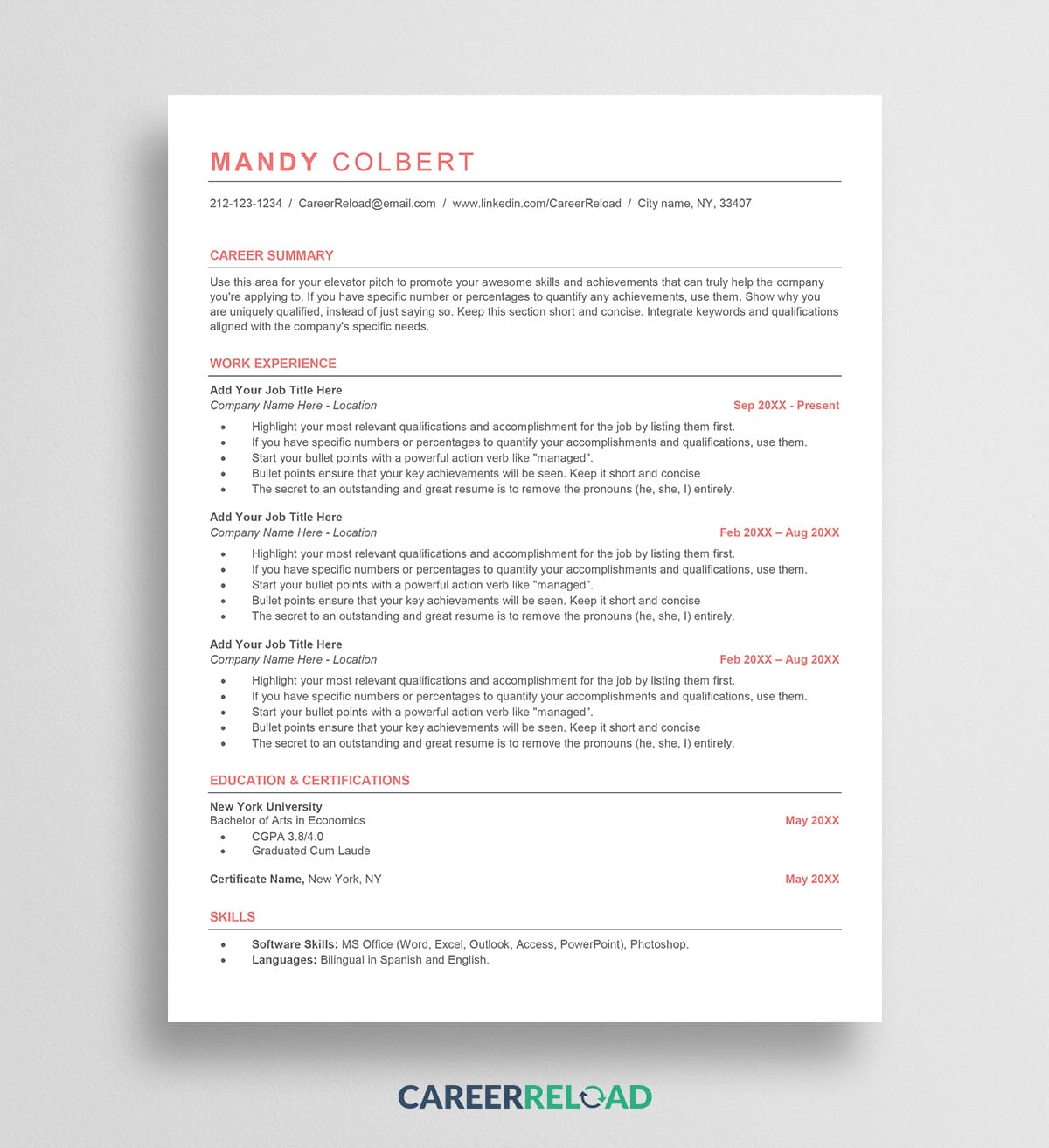
The Mandy template provides another reliable ATS-friendly option with a professional appearance. Its structure emphasizes your work accomplishments through well-organized sections and clear formatting.
The template uses standard elements throughout, from font choices to bullet point styles. This consistency helps ATS software extract your information accurately.
Mandy works well for candidates who prefer a traditional resume format with a slightly modern edge. The layout remains flexible enough to accommodate various career paths and experience levels.
Tips for Customizing Your Template
Once you choose a template, personalize it to match your experience and the specific job you’re applying for. Here are some strategies to make your ATS-friendly Google Docs resume template work harder for you.
Tailor Content to Each Position
Generic resumes rarely perform well. Read the job description carefully and adjust your resume to reflect the skills and experience the employer values most.
If the posting emphasizes “customer relationship management,” make sure that phrase appears in your resume where relevant. Match your experience to their requirements as closely as possible.
Quantify Your Achievements
Numbers catch attention and provide concrete evidence of your impact. Instead of vague statements, include specific metrics:
- Revenue generated
- Percentage improvements
- Team size managed
- Projects completed
- Time saved
- Cost reductions
These details help hiring managers understand the scope of your contributions and give ATS systems relevant data to match against job requirements.
Proofread Carefully
Spelling and grammar errors create a poor impression and can cause ATS systems to misread important information. Review your resume multiple times and consider asking someone else to check it as well.
Pay special attention to job titles, company names, and technical terms. Errors in these areas can cause your resume to miss important keyword matches.
Keep It Concise
Most positions require only a one-page resume, especially for candidates with less than 10 years of experience. Senior professionals may need two pages, but avoid going longer unless you have extensive relevant experience.
Focus on recent and relevant roles. Positions from more than 15 years ago typically need only brief mentions unless they’re directly related to the job you want.
Common ATS Mistakes to Avoid
Even with a good template, certain practices can hurt your chances of passing ATS screening. Watch out for these common errors.
Using Headers and Footers
Some ATS platforms cannot read information placed in headers and footers. Keep your contact details in the main body of your resume rather than at the top or bottom margins.
Relying on Formatting for Meaning
Don’t use tabs or spacing to align text or create structure. These formatting tricks may look fine on screen but can scramble when parsed by tracking software. Use the template’s built-in structure instead.
Including Irrelevant Information
Every line of your resume should support your application for the specific job. Remove outdated skills, unrelated hobbies, or personal details that don’t strengthen your candidacy.
Overusing Keywords
While keywords matter, stuffing your resume with repetitive terms makes it unreadable and may trigger spam filters. Use important terms naturally where they fit your actual experience.
Frequently Asked Questions
What makes a Google Docs resume template ATS-friendly?
An ATS-friendly template uses simple formatting that tracking software can read easily. This includes single-column layouts, standard fonts, clear section headings, and no graphics or complex design elements. The template should allow systems to extract your information accurately without confusion.
Can I use color in an ATS-friendly resume?
Yes, you can use color sparingly in ATS-friendly Google Docs resume templates. Subtle accent colors for headings or lines typically parse correctly. Avoid heavy color backgrounds or colored text in critical sections. Keep most content in black on white for best readability.
Should I submit my resume as a PDF or Word document?
Word format (.docx) works most reliably with ATS systems. Unless the job posting specifically requests PDF, submit your resume as a Word file. Google Docs lets you download your document in Word format easily.
How many pages should my ATS-friendly resume be?
One page works best for most job seekers with less than 10 years of experience. Senior professionals or those in academic fields may need two pages. Avoid longer resumes unless you have extensive relevant experience that directly applies to the position.
Do I need a different template for each industry?
Not necessarily. ATS requirements remain similar across industries, though some fields prefer more conservative designs while others accept modern styles. Choose a template that matches your industry’s professional standards while maintaining ATS compatibility.
Can I include my LinkedIn profile URL?
Yes, include your LinkedIn profile URL in your contact section. ATS systems typically recognize and parse LinkedIn URLs correctly. Make sure your profile matches your resume information.
Final Thoughts
Choosing the right resume format significantly impacts your job search success. ATS-friendly Google Docs resume templates give you the tools to create professional applications that pass screening software and impress hiring managers.
Start with a template that matches your industry and experience level. Customize the content to reflect each position’s requirements, include relevant keywords naturally, and quantify your achievements with specific metrics.
Remember that your resume opens doors, but your skills and experience get you hired. Use these templates as a foundation to present your qualifications clearly and professionally. With the right format and strong content, you’ll improve your chances of landing interviews and moving forward in your career.

We’re a team of writers and career experts who share practical insights to help you navigate the professional world. Our members include Certified Professional Résumé Writers (CPRW) and Certified Digital Career Strategists (CDCS), and we bring experience from many industries to help you build your career with confidence. Download free Word resume templates and resume templates for Google Docs.
Others also read
Mechanical Engineer Resume Example That Helps You Standout
Mobile App Developer Resume Example
Top Winter Season Jobs for The Cold Months
Improve Your Resume With The 5 P’s of Resume Writing
How to Recognize Reliable Recruiters
Remote Job Roles to Consider If You’re Pivoting Your Career
No Notice Resignation Letter Writing Tips and Example
Office Manager Resume Examples and Writing Guide
You Might Also Like These Free Templates
Google Docs Resume Format – Debbie
Free Resume Form Template
Free Resume Design – Megan
2 Column ATS Resume Template
ATS Friendly Resume Format for Word – Lindsay
Goal Planner Template
Cover Letter Template with Monogram
Professional Cover Letter Template
Free Modern Resume Template for Word
Free Job Application Tracker for Excel
Free Resume Template Download for Word – Farrah
Free ATS-Friendly Resume Template – Emily